Doomsurfing.Get the App

Doomsurfing, in everyday life

A little space.
For you.
For your family.

Make time for what is in front of you. Explore personal breaks and parent-led routines for a little distance from the feed.

In development for iPhone · Illustrative examples of the current product direction

For yourself

Give your attention
a place to land.

A quiet coffee, a piece of work, or a conversation worth being present for. Choose a short break from selected social apps and make room for it.

An everyday example

Half an hour for the task at hand.

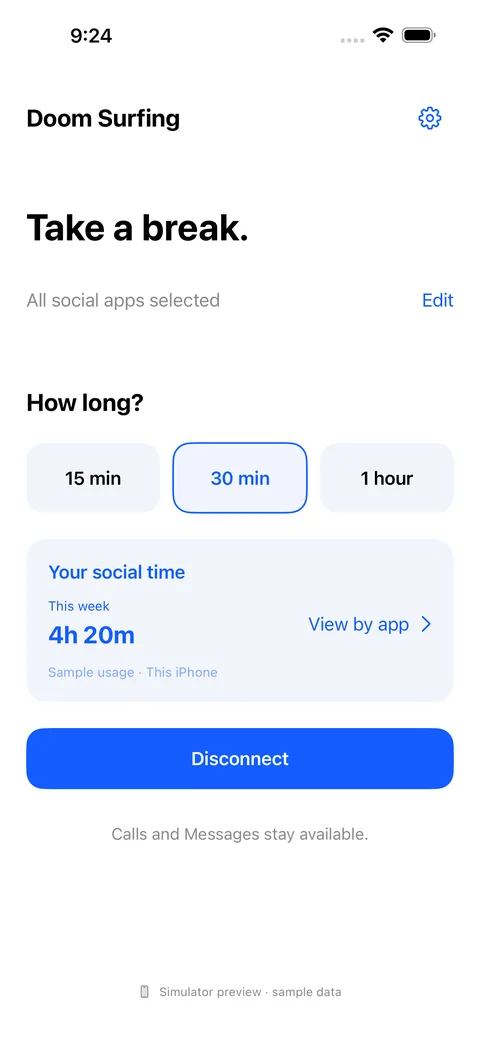
You sit down to finish something, but keep reaching for your feed. Choose a 30-minute break from the social apps you selected. There is a clear end to the pause, and your normal Phone and Apple Messages remain available.

In personal mode, you can choose to end the break early. It is your time to manage.

  • Choose what gets a pause. Focus on the social apps you want to step away from.
  • Keep a sense of time. See how long remains in your break.
  • Reflect on your habits. View available usage totals for your selected apps.
Personal break preview with duration choices, a sample social-time summary and the Disconnect button.
Personal mode · iOS simulator preview
Sample data; the design may change.

A pause from social apps.
Room for the essentials.

Phone and Apple Messages stay outside the block list. Calls or chats inside a social app you have chosen to block may be unavailable during the break. Your normal device and carrier settings still apply.

For parents and children

Make room for
family routines.

Support homework time or a bedtime routine with parent-led breaks, while giving your child a way to ask when they need access.

An everyday example

A little space for homework.

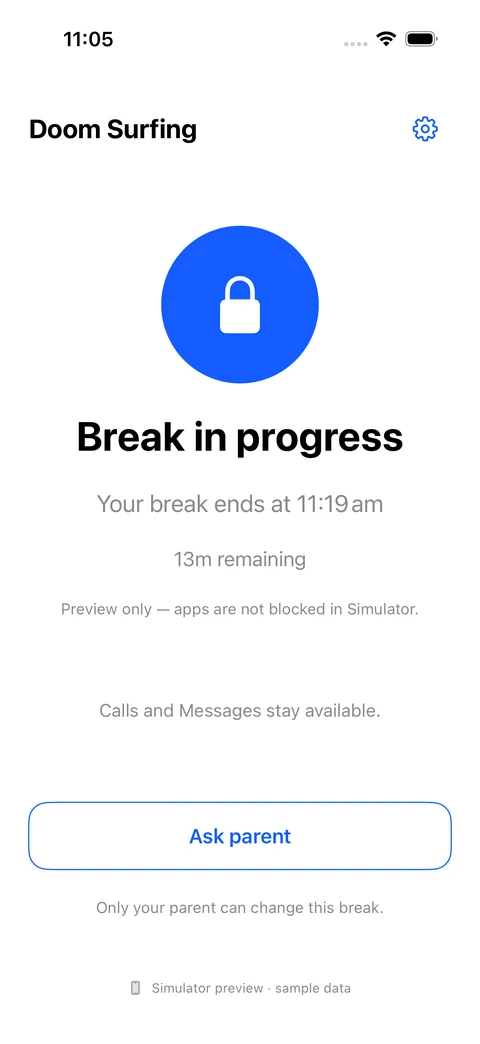
A parent requests a break from selected social apps while their child works on homework. The child can see the break in progress. If they need access, they can ask the parent, who decides whether to allow it.

The break and the request are visible parts of the experience, so both people know what is happening.

  • Parent-led boundaries. Request breaks and plan homework or bedtime routines.
  • A way to ask. Children can request temporary access; the parent can approve or decline.
  • Stay connected. Normal calls and Apple Messages remain available.

Family controls require Apple guardian approval and compatible family setup. Remote requests need to reach the child’s device before they take effect. Family availability and pricing have not yet been announced.

Child’s break-in-progress preview showing time remaining and an Ask parent button.
Child view · iOS simulator preview
Illustrative state; simulator apps are not blocked.

A few useful boundaries

Know what to expect.

Doomsurfing pauses selected apps. It does not disconnect your social accounts, and app blocking does not automatically block the same service’s website.

Usage reports show the history available from iOS, including its date coverage. The examples here illustrate the experience; they are not customer results or a promise of a particular outcome.

Read about privacy

Your time. Your choice.

Find your next break.

Explore planned individual pricing and availability.

Get the App

Apple, the Apple logo and iPhone are trademarks of Apple Inc., registered in the U.S. and other countries. App Store is a service mark of Apple Inc. Google Play and the Google Play logo are trademarks of Google LLC.